Why the Best PDF-to-Math Tool Before Nougat Got Equations Right Less Than 10% of the Time
Based on: Nougat: Neural Optical Understanding for Academic Documents — Lukas Blecher, Guillem Cucurull, Thomas Scialom, Robert Stojnic
Try this sometime: open a PDF of a physics paper, copy an equation out of it, and paste it into a text file. What you get back is not an equation. It's a scattered mess of symbols, sometimes in the wrong order, sometimes missing the fraction bar or the summation sign entirely. The PDF format was built to describe where ink goes on a page, not what that ink means. That's fine for reading. It's a disaster for reuse.
A team at Meta AI (Lukas Blecher, Guillem Cucurull, Thomas Scialom, and Robert Stojnic) decided to attack this head-on with a model called Nougat, short for Neural Optical Understanding for Academic Documents. The result they report is stark: on a test set of arXiv papers, the strongest existing tool for pulling math out of PDFs got the right answer on formulas about 9.7% of the time, measured by F1 score. Nougat hit 76.5%. That's not a small improvement. That's the difference between "unusable for anything except plain paragraphs" and "good enough to build on."
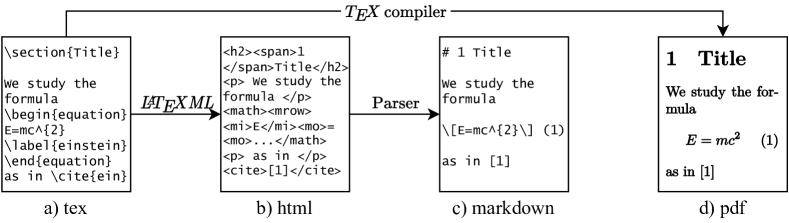
Figure from Nougat: Neural Optical Understanding for Academic Documents (Blecher et al., arXiv:2308.13418), licensed CC BY-SA 4.0.
Why a PDF doesn't actually contain the text you think it contains
Here's the part that trips people up: a PDF page usually looks like it has text on it, and sometimes you can even select and copy that text. But what's actually stored is a set of instructions like "draw the glyph for lowercase sigma at coordinates (412, 88)." There's no concept of "this sigma is part of a summation that spans three lines" or "this is a table cell in the second column." Reading order, structure, and meaning all get flattened into a pile of positioned shapes.
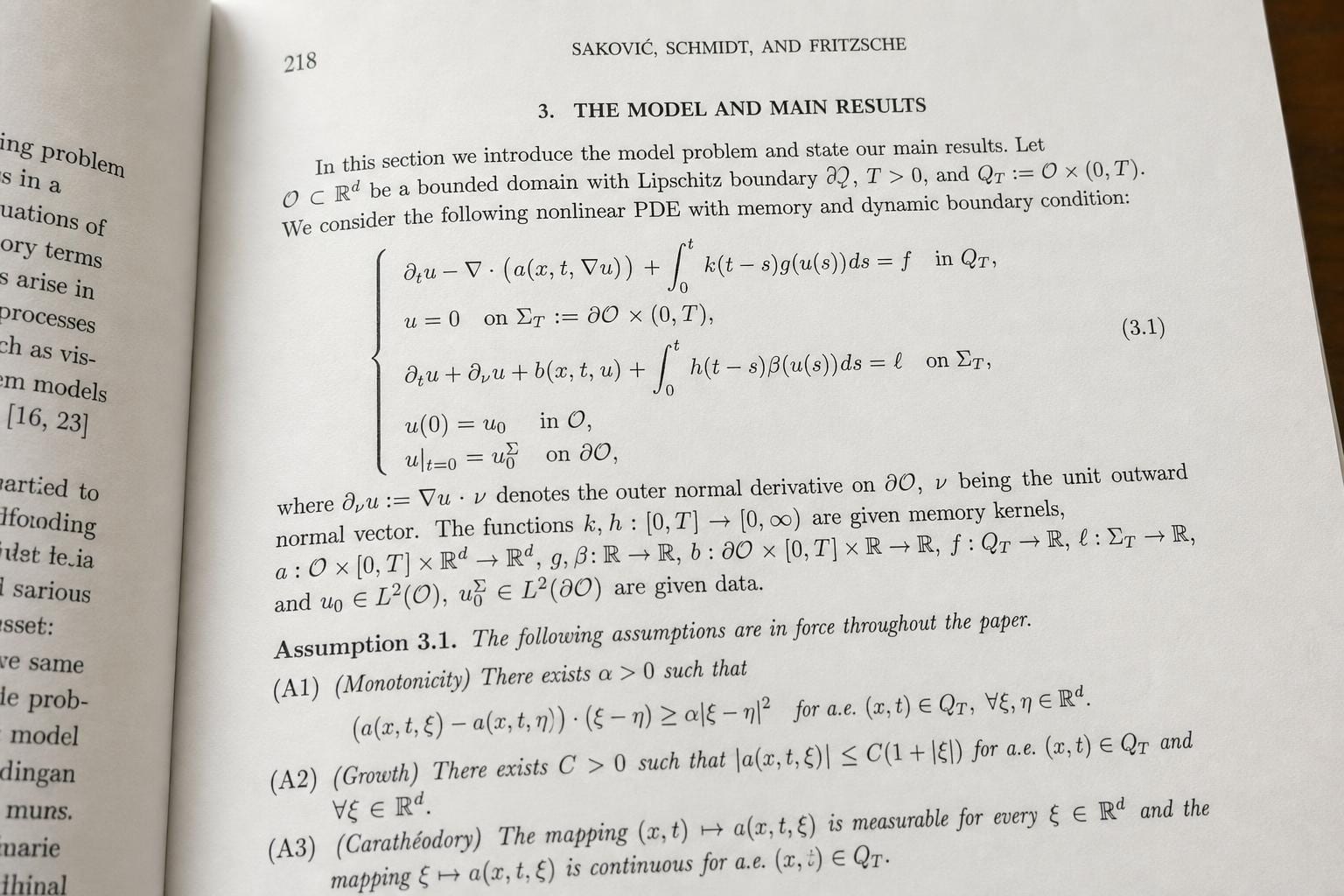
For a normal paragraph of English prose, this mostly doesn't matter. Existing PDF text extraction and OCR tools can stitch the glyphs back into readable sentences well enough. But academic papers are full of things that don't survive that flattening: nested fractions, matrices, multi-line equations, tables with merged cells, algorithms with indentation that carries meaning. Ask a standard OCR pipeline to hand you back a working LaTeX equation from a scanned math paper, and you'll usually get garbage.
This is the specific hole Nougat tries to fill: not "read the words on the page," which is a solved problem, but "reconstruct the actual markup a human would have written to produce this page."
No OCR step, no bounding boxes, just a page image in and markup out
The design choice that makes Nougat interesting is what it doesn't do. Most document-understanding pipelines are built from several stages bolted together: detect where the text blocks are, run OCR on each block, detect tables separately, run a formula recognizer on anything that looks like math, then try to stitch all of that back into a coherent document. Every stage introduces its own errors, and those errors compound.
Nougat skips all of it. It's a single Visual Transformer model that takes a rasterized image of a PDF page (rendered at 96 DPI, resized to fit a fixed 896×672 pixel box) and outputs a stream of markup tokens directly, one at a time, the same way a language model writes text one token after another. Under the hood it pairs a Swin Transformer, a vision model that processes an image in hierarchical patches, with a decoder based on mBART that generates the output sequence and cross-attends back to the image features as it writes. There's no separate math-detection module and no layout-analysis stage. The model just looks at the whole page and writes down what it sees, in a lightweight markup format that can express headings, bold and italic text, algorithms, inline and display LaTeX math, and LaTeX tables.
Two sizes were released: a base model at 350 million parameters with 10 decoder layers, and a smaller one at 250 million parameters with 4 layers. Both fall in the "you can run this on a single reasonable GPU" range, not the frontier-scale territory people usually mean when they say "large" model these days.
They had to build the training data before they could build the model
The genuinely hard part of this project probably wasn't the architecture. It was finding a way to get millions of examples of "page image paired with the exact markup that produced it," because that pairing doesn't exist anywhere as a ready-made dataset.
Their trick: arXiv papers are submitted with their original LaTeX source, not just the rendered PDF. So the team took the LaTeX source, converted it to HTML using a tool called LaTeXML, and then converted that HTML into their own lightweight markup format. Now they had ground-truth markup. Then they rendered that same source to a PDF and rasterized the pages to images. Now they had a matched pair: exact image, exact markup, no manual labeling required.
This produced most of their training data: 7.5 million pages from 1.7 million arXiv articles with usable LaTeX source. They added 536,000 pages from PubMed Central, parsed from XML rather than LaTeX, and 447,000 pages from the Industry Documents Library, which are actual scanned documents rather than digitally-born PDFs, to give the model some exposure to real scanner noise. Total: about 8.2 million page-markup pairs. That's the unglamorous part of the paper, and it's arguably the part that made the rest possible. A clever architecture trained on bad data usually loses to a boring architecture trained on a huge pile of correctly paired examples.
The results: strong on plain text, solid on math, still shaky on tables
On their arXiv test set, Nougat's overall edit distance (roughly, how many character-level insertions, deletions, and substitutions it takes to turn the model's output into the correct answer, where lower is better) came in at 0.071, with an overall F1 of 93.1% and a BLEU score of 89.1. Break it down by content type and the picture gets more interesting:
- Plain text: edit distance 0.058, F1 95.7%. This is close to solved.
- Math: edit distance 0.128, F1 76.5%, BLEU 56.9. Much harder, but usable, and a massive jump over the alternatives.
- Tables: edit distance 0.211, F1 78.0%, BLEU 69.7. The weakest category, and it shows in practice: merged cells and irregular layouts still confuse it.
For comparison, extracting text straight from the embedded PDF layer (when it exists at all) gave an edit distance of 0.255, worse than Nougat's math score and nearly four times worse than Nougat's plain-text score. And GROBID, a widely used tool for parsing scientific PDFs, even when boosted with a dedicated LaTeX-OCR add-on for formulas, only reached 9.7% F1 on math. That comparison is the headline result of the whole paper: turning math into usable LaTeX has quietly been almost broken across the industry, and this is one of the first approaches to meaningfully move the needle.
When the model gets stuck in a loop
The most honest part of the paper is the failure analysis, and the standout failure mode is one anyone who has worked with autoregressive generation will recognize immediately: repetition collapse. On about 1.5% of the test set, the model gets stuck predicting the same sentence, symbol, or line over and over, refusing to move on. This tends to happen on pages that are out of distribution for the training data: mostly blank pages, pages with unusual layouts, or scanned documents with heavy noise.
The team's fix is a detection-and-recovery trick applied at inference time, plus a data augmentation strategy during training that deliberately exposes the model to repetitive and degenerate examples so it learns to break out of loops. That combination cut the repetition rate by 32%. It's a real improvement, and also an admission that the problem isn't fully solved. If you're evaluating a tool like this for production use, "occasionally gets stuck chanting the same line forever" is exactly the kind of failure mode you want to know about up front, because it's silent: nothing crashes, you just get garbage output that looks superficially plausible.
Other limitations worth knowing about: the model processes one page at a time with no memory of other pages, so numbering in bibliographies and cross-references between sections can end up inconsistent across a multi-page document. It was trained almost entirely on English text, and documents in non-Latin scripts cause it to fail outright rather than degrade gracefully. Scanned paper documents perform noticeably worse than PDFs that were digitally typeset from the start, which makes sense given how much of the training data leaned toward clean, born-digital arXiv pages. And it's slow: on an NVIDIA A10G GPU, processing six pages in parallel took about 19.5 seconds per batch, roughly 1,400 tokens per page. GROBID, by contrast, processes about 10.6 PDFs per second. That's not a close race. Nougat trades a lot of speed for accuracy on the hard cases.
Why it matters if you're building or choosing an OCR pipeline
If your documents are contracts, invoices, or forms, none of this is directly relevant to you. Nougat was trained almost exclusively on academic papers, and it shows: multi-column magazine layouts, handwriting, and business documents are outside what it was built for.
But if you're dealing with scientific or technical PDFs where formulas, tables, and structured markup actually carry meaning, the lesson from this paper generalizes past Nougat itself. It's a working demonstration that end-to-end image-to-markup models can beat pipelines stitched together from OCR plus layout detection plus a separate formula recognizer, at least for structured technical content. The 9.7%-versus-76.5% gap on math recognition isn't a rounding difference between two mediocre approaches. It's the difference between a tool you'd never trust with a research paper and one you might actually build a product on.
The practical takeaway for anyone evaluating OCR engines: "handles text well" and "handles math and tables well" are genuinely different capabilities, and a lot of vendors will happily quote you an overall accuracy number that hides a huge gap between the two. If your documents are dense with equations, ask specifically about formula and table performance, not just general text accuracy. And keep an eye on failure modes like repetition collapse. A model that occasionally loops forever on a bad page is a different kind of risk than one that's simply a bit less accurate on average, and it's the kind of thing that only shows up once you've tested against your own weird, real-world documents rather than a clean benchmark set.